
Prerna Portal Parent Aadhaar Mismatch Fix (Guide 2026)
If you’re trying to verify your child’s details on the Prerna Portal and encounter an Aadhaar mismatch for parent information, it can be frustrating. But don’t worry! This issue can usually be fixed with a few simple steps. In this guide, we’ll walk you through how to resolve the Aadhaar mismatch issue quickly and easily.

Why the Aadhaar Mismatch Happens
The Aadhaar mismatch often occurs because the details entered in the portal don’t match the information available on the parent’s Aadhaar card. This could happen due to:
It’s important to resolve this issue as the portal requires accurate details for verifying parent information and linking it with student data.
You can also read: Prerna Portal Student Transfer Process Guide Update (2026)
How to Fix Aadhaar Mismatch on Prerna Portal
Follow these steps to fix the Aadhaar mismatch issue:
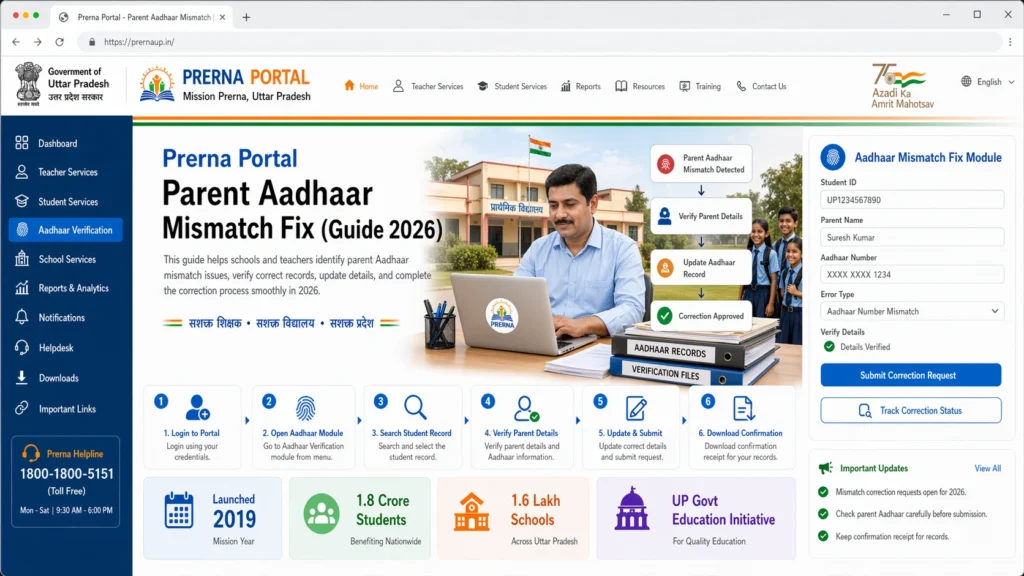
Before making any changes on the portal, double-check the details on the parent’s Aadhaar card. Look at the following:
- Full name of the parent (ensure it’s spelled correctly)
- Date of birth
- Aadhaar number
Ensure that all the details are correctly noted.
Visit the Prerna Portal (prernaup.in).
Click on Teacher Login or Admin Login (depending on your role).
Enter your registered mobile number and OTP to log in.
Once logged in, go to the student data section where parent details are listed.
he mismatch is due to incorrect information on the portal, follow these steps:
- Find the student’s record where the parent Aadhaar mismatch is showing.
- Click on Edit or Update next to the parent’s details.
- Enter the correct name, date of birth, and Aadhaar number as per the parent’s Aadhaar card.
- Save the changes.
This should resolve any minor errors in parent information.
After saving, recheck the parent details to ensure everything is correct. If everything looks good, you can proceed with verifying the data.
f the mismatch continues even after updating the details, it’s best to reach out to Prerna Portal Support. You can contact them for assistance if:
- The Aadhaar number is correct but still doesn’t match
- The system rejects the Aadhaar update
Support can help you manually fix the issue or advise on further steps.
Once the Aadhaar details are updated and correct, you can proceed with the student verification process. Make sure to:
- Click Verify for the parent and student details
- Save the updated information
This will ensure that the parent’s details are correctly linked to the student’s profile.
Quick Tips for Fixing Aadhaar Mismatch
Double-check spelling
Even small spelling errors can cause a mismatch.
Use the correct Aadhaar number
Ensure the Aadhaar number entered is exactly the same as shown on the card.
Use the right format
Ensure the name and date of birth on the portal match the Aadhaar card format.
FAQs
Conclusion
Fixing the Aadhaar mismatch on the Prerna Portal is a straightforward process if you follow the steps carefully. Always make sure that the details entered are accurate and match the Aadhaar card. If you continue to face issues, don’t hesitate to reach out to Prerna Support for further help.
By following this simple guide, you’ll be able to correct the Aadhaar mismatch and complete the student verification process smoothly.


