
Prerna Portal for Headmasters: Full Guide Latest Update 2026
The Prerna Portal is a critical tool for managing various aspects of school administration in Uttar Pradesh. It is especially useful for Headmasters (HMs) who are responsible for overseeing the functioning of the school, tracking student and teacher data, and ensuring that school operations are aligned with state standards.
This full guide will help Headmasters understand how to use the Prerna Portal to streamline school management, track progress, and stay compliant with Mission Prerna goals.
What Is the Prerna Portal?
The Prerna Portal is an online platform developed by the Uttar Pradesh Basic Education Department. It is designed to help teachers, school administrators, and officials manage school operations, track student progress, monitor teacher performance, and maintain accurate school records. The portal is part of the Mission Prerna initiative, which aims to improve the quality of education in the state by digitizing educational processes.
You can also read: Prerna Portal New Latest Update Guide 2026‑27
Key Features of the Prerna Portal for Headmasters:
Key Tasks for Headmasters on the Prerna Portal
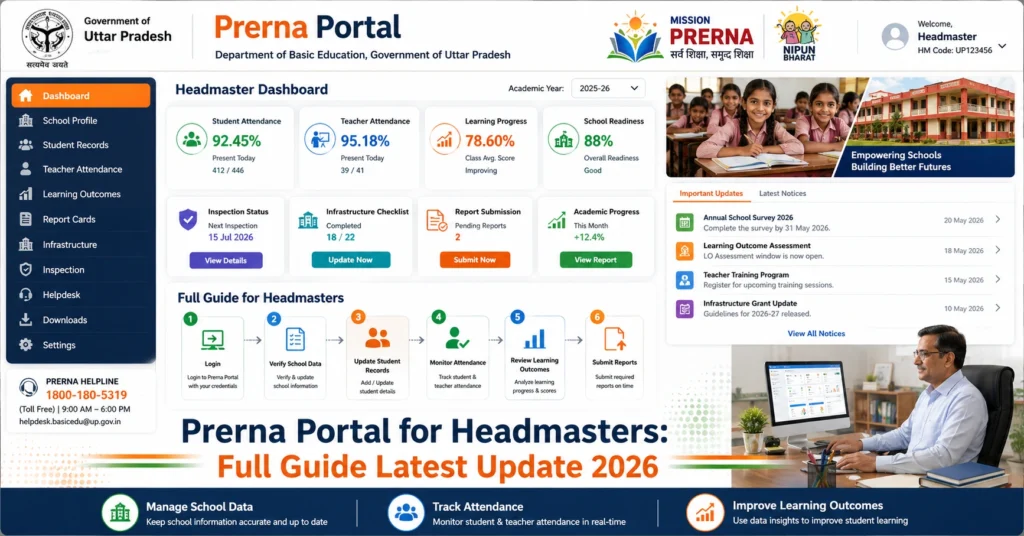
Managing Student Data
As a Headmaster, you are responsible for ensuring that all student records are up to date. This includes:
Ensure all students are enrolled and their personal details (name, date of birth, Aadhaar number, etc.) are correctly entered in the portal.
Attendance Management: Update daily attendance records for students. Make sure that attendance is taken on time and is accurate.
Track students’ academic performance using the Holistic Progress Report (HPR). Ensure that teachers are updating their assessments regularly.
Tip: Double-check the accuracy of student data as discrepancies can lead to issues with DBT or scholarship benefits.
Managing Teacher Data
Headmasters are responsible for managing teacher data in the Prerna Portal. This includes:
Tip: Regularly review the teacher’s training and performance records to help guide their professional growth.
School Infrastructure and Hygiene Management
Headmasters must ensure that the school’s facilities meet the required standards. The Prerna Portal helps track the condition of:
Classrooms:
Ensure that classrooms are clean, properly furnished, and conducive to learning.
Sanitation Facilities:
Monitor the condition of toilets, drinking water, and sanitation facilities. Upload photos of these facilities to the portal as required.
Safety and Security:
Track safety measures in place, such as fire safety equipment and first-aid kits, and ensure that these are regularly updated in the portal.
Tip: Maintain regular cleanliness audits and ensure that photos of the toilets and sanitation facilities are uploaded on the portal to reflect the current condition.
Mid-Day Meal (MDM) Monitoring
As a Headmaster, it is crucial to ensure that the Mid-Day Meal scheme is being executed correctly. The Prerna Portal allows you to:
Tip: Ensure that the Mid-Day Meal data is updated on time, and report any hygiene issues related to meal preparation.
DBT (Direct Benefit Transfer) Management
Headmasters need to ensure that eligible students receive Direct Benefit Transfers under various government schemes. On the Prerna Portal, you will need to:
Verify DBT Eligibility:
Ensure that students who are eligible for DBT schemes like scholarships and financial aid are registered correctly.
Update Bank and Aadhaar Details:
Ensure that the students’ bank account details and Aadhaar numbers are entered correctly for DBT processing.
Tip: Regularly review the DBT status of students to ensure there are no delays or discrepancies in the benefits they receive.
Data Submission and Reporting
Headmasters are required to submit monthly, quarterly, and annual reports on various aspects of school management. This includes:
Attendance Reports:
Submit the attendance data for both students and teachers to the education department.
Progress Reports:
Ensure that the Holistic Progress Reports (HPR) for students are submitted.
Mid-Day Meal (MDM) Reports:
Submit the MDM attendance and meal distribution data.
Tip: Keep track of submission deadlines and ensure that all required reports are submitted on time to avoid penalties or delays in funding.
Common Challenges and How to Overcome Them
Challenge 1: Incorrect Data Entry
Solution: Regularly verify and cross-check the data entered into the portal. Ensure that both student and teacher data are accurate before final submission.
Challenge 2: Photo Upload Issues
Solution: Ensure that all photos uploaded are in the correct format (JPEG/PNG) and under the 2 MB size limit. Check the quality of photos to ensure clarity.
Challenge 3: OTP and Login Problems
Solution: If there are issues with OTP or login, ensure that your registered mobile number and email ID are up to date. Clear cache and cookies on your browser or use another browser.
Challenge 4: Missed Attendance
Solution: Set a daily reminder to mark attendance first thing in the morning. Check for any discrepancies and correct them before the day ends.
FAQs
Conclusion
As a Headmaster, using the Prerna Portal effectively is crucial for the smooth functioning of your school. From student and teacher data management to ensuring cleanliness and hygiene in the school, the portal offers a comprehensive system for managing all aspects of school life.
By following this guide and the regular tasks, you can contribute to the success of Mission Prerna and help improve the quality of education in Uttar Pradesh.
If you have any further questions or need assistance, don’t hesitate to reach out to the Prerna Portal support team.


