
Prerna HPC 2025‑26 Marks Entry Guide (Latest Update 2026)
The Holistic Progress Card (HPC) on the Prerna Portal lets teachers record and review students’ marks across academics and other skill areas. The 2025‑26 academic year marks a renewed focus on comprehensive assessment, so entering marks accurately is important for fair and meaningful reporting.
This guide explains what to enter, where to enter it, and how to avoid mistakes in the Prerna Portal.

What Is HPC Marks Entry
HPC Marks Entry on the Prerna Portal is the process teachers use to record:
These marks together make the Holistic Progress Card, a broader student evaluation tool beyond annual exams.
You can also read: Holistic Progress Card on Prerna Portal: Complete Guide 2026
Who Can Enter HPC Marks
Make sure you have the correct role permissions in the portal before starting.
Step‑by‑Step Guide for HPC 2025‑26 Marks Entry
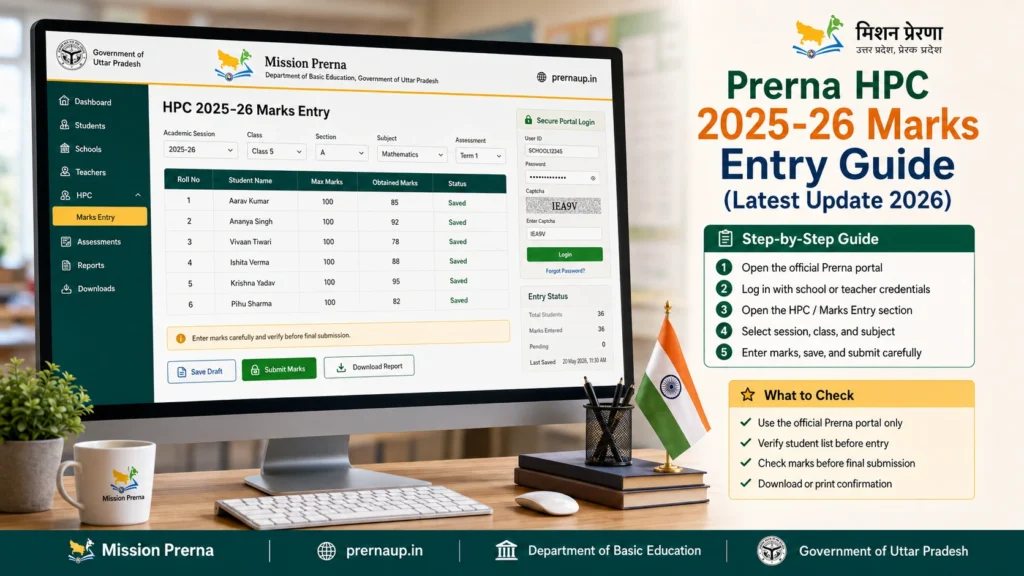
- Open the Prerna Portal in your browser and enter your teacher credentials (username + password/OTP).
- From the dashboard, choose HPC or Holistic Progress Card and then Marks Entry.
- Choose the class, section, and term (Term 1, Mid‑term, Final, etc.) for which you want to enter marks.
- Step 4: Pick the Student or Entire Class List
- You can:
- Enter marks for a single student, or
- Upload marks for the entire class
- (This depends on your interface and permissions.)
- Fill in marks for each academic subject
- Enter marks for co‑scholastic areas
- Record behavioral and life skill evaluations
- Add optional notes if the portal allows
- Carefully review all entries before final submission. Make sure the marks reflect student performance accurately.
- When finished, use Save or Submit. Wait for confirmation that data has been accepted.
- आप जानकारी डाउनलोड भी कर सकते हैं, अगर आक इसकी जरूरत हो।
Step 8: Logout
- For security, always logout after finishing your entry session.
How to Enter Marks Correctly
Common Mistakes to Avoid
Troubleshooting Table for HPC Marks Entry
| Problem / Issue | Possible Cause | Solution / Fix |
|---|---|---|
| Cannot access marks entry | Role or permission issue | Check user access or contact admin |
| Marks not saving | Temporary network/server error | Refresh, retry submission, or save offline mode |
| Wrong class/section shown | Selection error | Re‑select correct class/section before entering |
| Marks disappearing after save | Browser cache issue | Clear cache or use a different browser |
| Incomplete co‑scholastic fields | Fields left blank | Enter marks in all required sections |
Best Practices for Teachers
FAQs
Conclusion
The Prerna HPC 2025‑26 Marks Entry process is designed to make evaluation more complete and meaningful. Taking time to enter marks accurately ensures students get fair and comprehensive progress reports.
Following the steps and tips above will help you avoid common issues and complete your data entry quickly.


