
Prerna DBT App vs Prerna Portal: Key Differences Update 2026
If you’re using Prerna for education management in Uttar Pradesh, you may have noticed there are two main platforms — the Prerna Portal and the Prerna DBT App. Both are important, but they serve different purposes. Understanding how they differ will help you use each one correctly and avoid confusion.
Below is a simple, user‑friendly guide that explains the main differences between the Prerna DBT App and the Prerna Portal in clear language.
What Is the Prerna Portal?
The Prerna Portal is a web‑based platform accessed through a browser (like Chrome or Firefox). It is the main hub for teachers, school administrators, and officials.
Key Features of Prerna Portal:
Who Uses It?
The portal gives you the full set of features and administrative tools in one place.
You can also read: Prerna Portal First-Time Teacher Setup Guide Update (2026)
What Is the Prerna DBT App?
The Prerna DBT App is a mobile application designed specifically to help with DBT tasks (Direct Benefit Transfer).
Key Features of Prerna DBT App:
Who Uses It?
The app is primarily for DBT work on the go. It’s lighter and faster than the full portal for specific DBT tasks.
Main Differences Between the Portal and the App
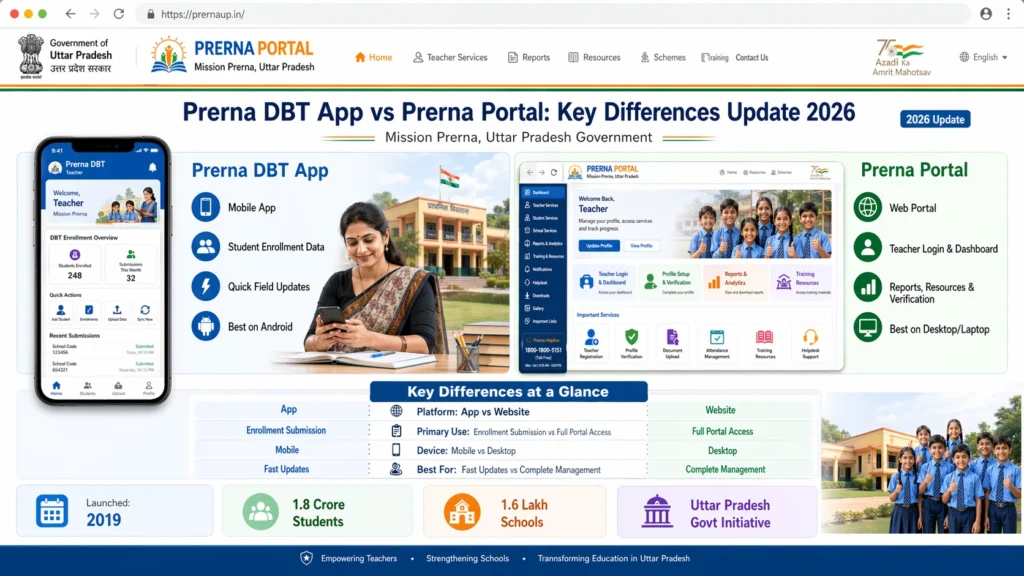
| Feature | Prerna Portal | Prerna DBT App |
|---|---|---|
| Platform Type | Browser‑based web portal | Mobile application |
| Primary Purpose | Full education management | Focus only on DBT verification |
| Login Method | Mobile number + OTP/password | Mobile number + OTP |
| Student Resources | Yes (lesson plans, training, reports) | No (DBT only) |
| DBT Verification | Yes | Yes (main feature) |
| Teaching Tools | Yes | No |
| Administrative Tools | Yes | Limited |
| Accessibility | Requires internet & browser | Works smoother on mobile |
| Updates & Notifications | Through portal | Instant app notifications |
When Should You Use Each One?
When to Use the Prerna Portal
Use the portal when you need:
The portal is your main dashboard and should be used for most official tasks.
When to Use the Prerna DBT App
Use the app when you need to:
The DBT app is mobile‑friendly, fast, and useful when you’re not at a computer.
Why Both Tools Are Important
Both the Prerna Portal and the Prerna DBT App work together to make your work easier:
Prerna Portal
Best for planning, records, reports, and teaching
Comprehensive platform for all education tasks
Prerna DBT App
Best for quick DBT check and verification
Handy for field use and fast updates
Think of the portal as the main office desk where you do detailed work, and the app as the pocket tool to complete your DBT work anywhere.
FAQs
Conclusion
The Prerna Portal and the Prerna DBT App are both important parts of the education system in Uttar Pradesh. While they share some common features like login and DBT verification, they serve very different purposes.
Use the Prerna Portal for full access to teaching tools, student data, reports, and professional development.
Use the Prerna DBT App for fast and mobile‑friendly DBT verification.
Understanding the differences will help you make the most of both platforms and get your tasks done quickly and accurately.


