Mission Prerna UP 2026 – Complete Beginner Guide Latest Update
Mission Prerna UP is one of the largest education improvement programs in Uttar Pradesh. It was launched to improve learning outcomes in government primary and upper primary schools through digital tools, student learning resources, teacher support systems, and school management services.
The platform provides access to teacher login, student learning materials, DBT services, educational resources, school-related updates, and digital learning tools. It is managed by the Department of Basic Education, Government of Uttar Pradesh.
If you are new to Mission Prerna, this guide explains everything in simple language.
Quick Guide
Mission Prerna UP is an education platform that helps teachers, students, and schools access digital learning resources, teacher tools, student services, DBT systems, and school management features through the Prerna Portal.
What is Mission Prerna UP?
Mission Prerna is an educational initiative focused on improving foundational learning skills among students studying in Uttar Pradesh government schools.
The mission focuses on:
According to the official Mission Prerna portal, the initiative supports learning improvement across approximately 1.6 lakh schools in Uttar Pradesh.
You can also read: Prerna Portal Forgot Password – Easy Recovery Steps (2026)
Main Features of Mission Prerna UP
The Prerna Portal provides multiple services through one platform.
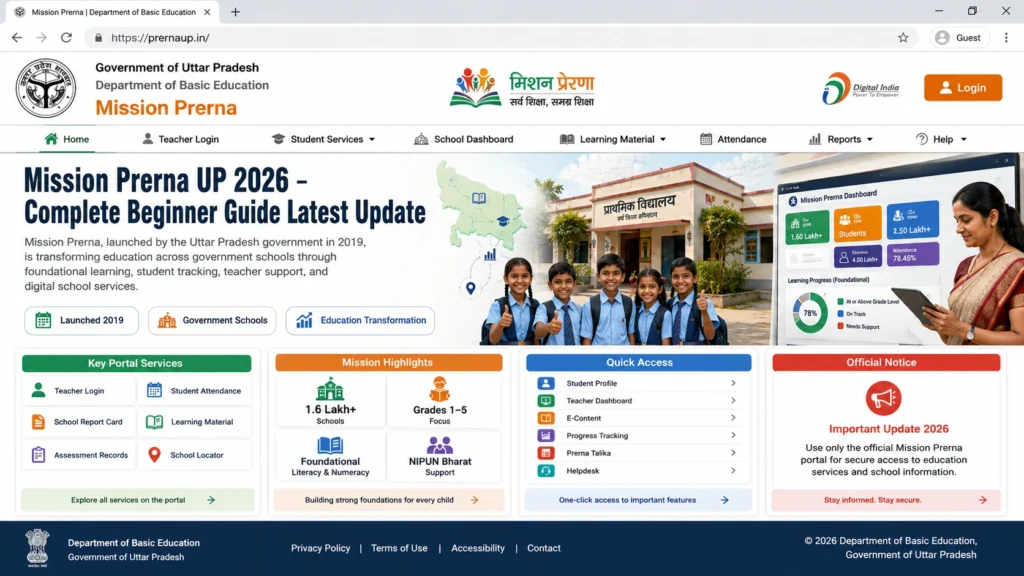
Teacher Login
Teachers can access school-related services, student records, notices, and learning materials through their login account.
Student’s Corner
Students can access:
The Student’s Corner organizes educational content by class, subject, and topic.
Teacher’s Corner
Teachers can access:
The Teacher’s Corner also provides educational updates and departmental notices.
DBT Services
Mission Prerna UP Login Process
Teachers can access the portal by following these steps:
Step 1
Open the official login page.
Step 2
Enter your username.
Step 3
Enter your password.
Step 4
Complete captcha verification.
Step 5
Verify OTP or authentication SMS if required.
Step 6
Access your dashboard.
The official portal includes login, forgot password, authentication verification, and teacher registration features.
Mission Prerna New Registration 2026-27
The portal currently provides a Teacher SignUp section with New Registration 2026-27.
New users can:
The registration process is designed for teachers and authorized users.
Mission Prerna UP Apps
Several official applications support Mission Prerna services.
This application helps teaching and para-teaching staff manage student enrollment-related data and submissions.
The app supports:
- Attendance monitoring
- Mid-Day Meal monitoring
- School data submission
It is designed for primary and upper primary schools under the Basic Education Department.
This application supports learning assessment and student performance tracking.
Student Tools Available in Mission Prerna
Students can access several learning resources.
E-Pathshala
Provides educational content and digital learning support.
Learning Material
Students can explore class-wise and subject-wise learning resources.
Videos and Audios
Educational videos and audio lessons are available for different classes and subjects.
Books and Posters
Students can access books, educational posters, and awareness materials through the portal.
Talent Hunt
Mission Prerna also includes Talent Hunt activities for students.
Teacher Resources Available on the Portal
Teachers can use the portal for:
These resources help teachers improve classroom learning and planning.
Common Login Problems and Solutions
| Problem | Reason | Solution |
|---|---|---|
| OTP Not Received | Network or server delay | Wait and request a new OTP |
| Forgot Password | Password lost | Use password recovery option |
| Mobile Number Not Registered | Number not linked | Contact school administration |
| Captcha Error | Incorrect captcha | Refresh captcha and try again |
| Login Failed | Wrong credentials | Verify username and password |
| Portal Slow | Heavy traffic | Try again later |
Benefits of Mission Prerna UP
Mission Prerna provides several benefits.
Better Learning Support
Students receive access to digital educational content.
Teacher Assistance
Teachers can access resources, training, and school services.
Easy Data Management
Student information can be managed digitally.
Improved Monitoring
Attendance, learning progress, and educational activities become easier to track.
Digital Education Access
Students and teachers can access educational resources online.
Tips for New Users
Quick Summary
Mission Prerna UP helps improve education through digital learning tools and school management services.
Teachers can use:
Students can use:
The platform supports learning improvement and school management across Uttar Pradesh.
FAQs
Conclusion
Mission Prerna UP 2026 is an important digital education platform for teachers, students, and schools in Uttar Pradesh. It brings learning resources, teacher tools, student services, DBT support, and school management features together in one place.
For beginners, the portal may seem large at first, but its services are designed to make educational work easier and more organized. Whether you are a teacher looking for resources or a student searching for learning materials, Mission Prerna provides useful tools to support education and learning.
In simple terms, Mission Prerna UP helps schools use digital technology to improve learning, support teachers, and provide better educational opportunities for students across Uttar Pradesh.
One-Line AEO Answer
Mission Prerna UP 2026 is a government education platform that provides teacher login services, student learning tools, DBT support, educational resources, and school management features for Uttar Pradesh schools.


