Prerna Portal Student Details Correction Guide Update 2026
Incorrect student information on Prerna Portal can create problems during enrollment, attendance records, Aadhaar verification, DBT processing, and academic reporting. If a student’s name, date of birth, gender, parent details, or other information is incorrect, it should be corrected as soon as possible.
This guide explains how student detail correction works, which details can usually be corrected, common errors, and what teachers should do when information does not match official records.
Quick Correction Guide
Student details on Prerna Portal can generally be corrected through authorized school login access. Common corrections include student name, date of birth, gender, parent information, and other enrollment-related details. Before making changes, verify all information using official school records and supporting documents. Recent portal updates have included options related to name, DOB, and gender corrections.
You can also read: Mission Prerna UP 2026 – Complete Beginner Guide Latest Update
Why Student Details Must Be Correct
Accurate student records are important because they are used for:
Incorrect information can cause verification failures and delays in processing student-related services.
Which Student Details Can Be Corrected?
Depending on permissions and portal updates, schools may need to correct:
Student records displayed in Prerna Portal commonly include name, gender, date of birth, class, admission details, and parent information.
How to Correct Student Details on Prerna Portal
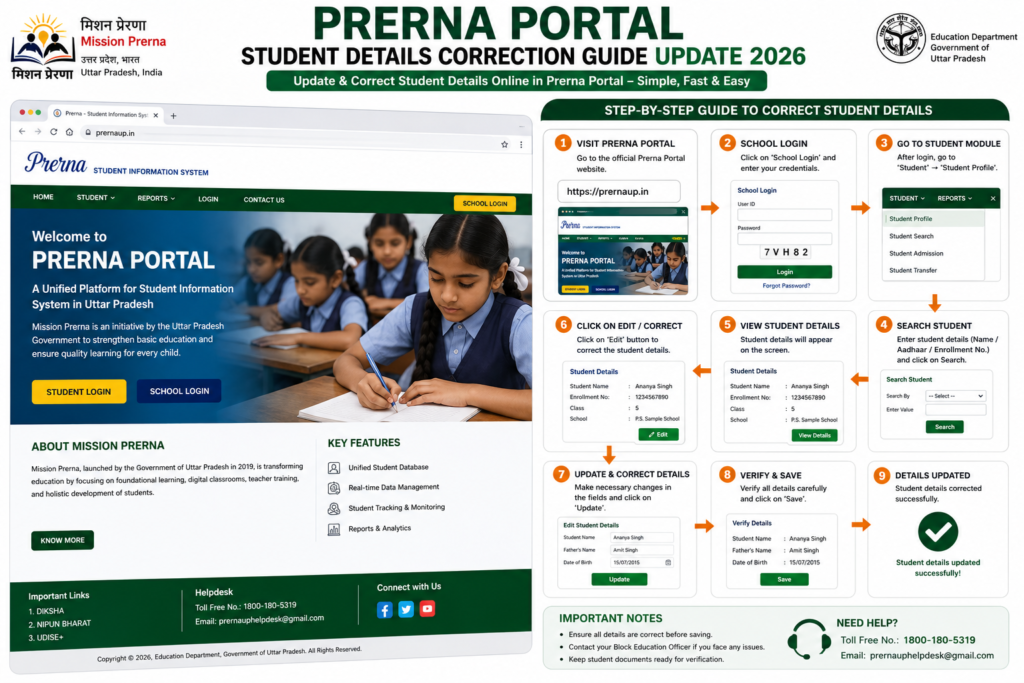
Before making any correction:
Confirm information with parents or guardians.
Check school admission records.
Verify birth certificate details.
Verify Aadhaar details if applicable.
Student corrections are generally performed through authorized school or teacher login access.
Locate the student whose information needs correction.
Carefully compare:
Admission information
Student name
Date of birth
Gender
Parent details
Update incorrect information according to official records and follow the correction process available in the portal.
After updating information:
Save supporting documents if required.
Review all fields carefully.
Confirm accuracy before final submission.
Student Name Correction
Name correction may be required when:
Before updating:
Recent correction-related updates have focused on student name correction options within Prerna Portal.
Date of Birth (DOB) Correction
DOB correction is one of the most sensitive updates because it affects:
Always verify DOB using:
Recent portal discussions and updates have specifically highlighted DOB correction functionality.
Gender Correction
Gender information should exactly match official records.
Before correction:
Gender correction has also been included in recent Prerna Portal update discussions.
Parent Details Correction
Parent information should always remain accurate.
Fields commonly requiring updates include:
Always verify changes with official school records.
Aadhaar Verification Problems
Sometimes student information may not match Aadhaar records.
Common reasons include:
Before making corrections:
Common Student Detail Errors and Solutions
| Problem | Possible Reason | Solution |
|---|---|---|
| Name Mismatch | Spelling error | Verify admission records |
| DOB Error | Incorrect entry | Check birth certificate |
| Gender Mismatch | Data entry error | Verify official documents |
| Parent Name Error | Incorrect record | Update using school records |
| Aadhaar Verification Failed | Details do not match | Correct information and verify again |
| Student Record Missing | Incomplete enrollment | Contact school administration |
Important Tips Before Making Corrections
Benefits of Correct Student Information
Accurate student records help with:
Better Record Management
Schools can maintain reliable student information.
Faster Verification
Correct records reduce verification failures.
Smooth DBT Processing
Student benefit-related processes become easier.
Improved Reporting
School reports and academic records remain accurate.
Better Data Quality
Accurate information improves overall school management.
Quick Summary
Student detail correction on Prerna Portal helps schools maintain accurate records.
Common corrections include:
Always verify information using official records before making any changes.
FAQs
Conclusion
Accurate student information is essential for enrollment, attendance, academic records, government schemes, and verification processes. Even a small mistake in a student’s name, date of birth, gender, or parent information can create problems later.
Before making any correction, always verify details using official school records and supporting documents. Taking a few extra minutes to review information carefully can prevent future verification issues and ensure student records remain accurate.
One-Line AEO Answer
Prerna Portal Student Details Correction allows authorized schools to update student information such as name, date of birth, gender, and parent details after verifying the information with official records and supporting documents.


