Prerna Portal Name, DOB and Gender Correction Guide 2026
Correct student information is essential for enrollment, DBT benefits, academic records, and government schemes. Prerna Portal allows authorized school staff to correct student name, date of birth (DOB), and gender in 2026.
Incorrect data can cause issues with Aadhaar verification, student promotion, and academic reports, so it’s important to correct it promptly.
This guide explains how to update these details safely, what documents to use, common mistakes, and tips to avoid errors.
Quick Correction Guide
Student details on Prerna Portal can generally be corrected through authorized school login access. Common corrections include student name, date of birth, gender, parent information, and other enrollment-related details. Before making changes, verify all information using official school records and supporting documents.
You can also read: Prerna Portal Student Details Correction Guide Update 2026
Why Correct Name, DOB, and Gender?
Accurate details help in:
Even small errors in name spelling, DOB format, or gender selection can cause verification failures.
Which Details Can Be Corrected?
Step-by-Step Guide to Correct Name, DOB, and Gender
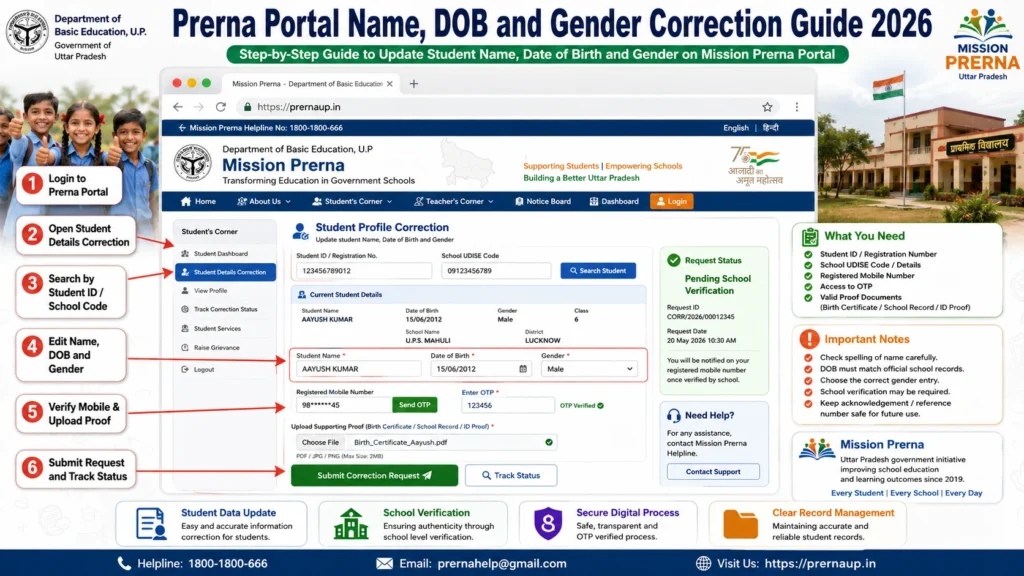
Check the following before making any correction:
Parent or guardian records
Birth certificate
Admission records
Aadhaar card
Only authorized teachers or school staff can update student information.
Open the Student Information section.
Select the student whose details need correction.
Compare portal data with official documents for:
Gender
Name spelling
Date of birth
Correct the details exactly as per official records.
Enter accurate name, DOB, and gender.
Submit changes for verification.
Check if the corrections are reflected after approval.
Keep a copy of official documents as proof.
Approval and Verification Process
Once corrections are submitted:
Tip: Avoid making multiple edits at once. Submit corrections carefully and wait for approval.
Common Errors and How to Avoid Them
| Problem | Reason | Solution |
|---|---|---|
| Name mismatch | Spelling error | Verify birth certificate and admission records |
| DOB Error | Incorrect entry | Check birth certificate |
| Gender Mismatch | Data entry error | Verify official documents |
| Parent Name Error | Incorrect record | Update using school records |
| Aadhaar Verification Failed | Details do not match | Correct information and verify again |
| Multiple correction attempts | System restrictions | Submit one correction at a time |
Tips to Prevent Future Errors
Quick Summary
FAQs
Conclusion
Correcting student name, DOB, and gender on Prerna Portal ensures smooth DBT processing, accurate academic records, and proper school administration.
By verifying official documents and following the correction process carefully, teachers can maintain accurate student records and prevent verification failures in the future.
In short: Verify documents, update Name, DOB, and Gender carefully, submit for approval, and maintain accurate records for every student.


