Mission Prerna UP – Login, Apps and Student Tools Update 2026
Mission Prerna UP is one of the biggest education improvement programs launched by the Government of Uttar Pradesh. It helps teachers, students, and schools use digital tools for learning, student management, attendance monitoring, DBT services, and educational resources.
The official Mission Prerna portal provides services like Teacher Login, Student’s Corner, Teacher’s Corner, DBT Portal, User Manuals, Android Applications, Learning Material, and School Resources. The portal is managed by the Department of Basic Education, Government of Uttar Pradesh and supported by UPDESCO.
If you are a teacher, parent, student, or school staff member, this guide explains everything about Mission Prerna UP in simple language.
What is Mission Prerna UP?
Mission Prerna UP is an educational initiative created to improve learning quality in government primary and upper primary schools across Uttar Pradesh.
The program focuses on:
The official portal brings these services together through one online platform.
You can also read: Prerna UP Teacher Login: OTP and Password Fix Guide 2026
Quick Answer
Mission Prerna UP is an online education platform that helps teachers, students, and schools access login services, learning tools, DBT services, attendance systems, educational resources, and official school-related information through the Prerna Portal.
Mission Prerna UP Login Guide
Teachers can access important services using the official login system.
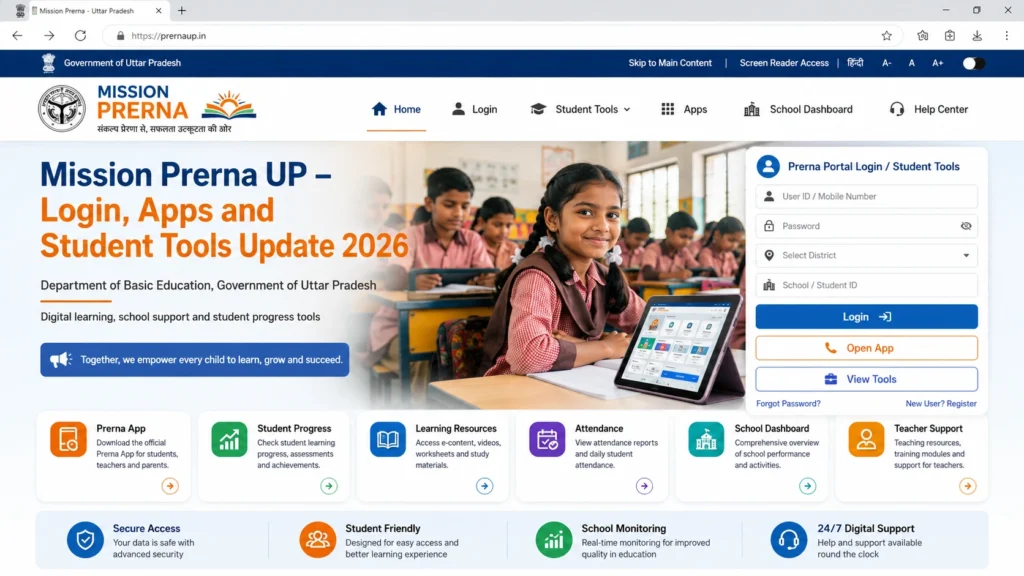
- Open the official Mission Prerna UP portal.
- Choose the Teacher Login option available on the portal homepage.
- Fill in:
- Username
- Password
- Captcha
- Some login processes require OTP or Authentication SMS verification.
- After successful verification, users can access their dashboard and available services.
- The official login page includes Teacher Login, Forgot Password, Authentication SMS verification, and registration options.
Prerna Portal New Registration 2026-27
The portal currently provides a Teacher SignUp and New Registration 2026-27 option.
Teachers who need a new account can:
The official login page shows registration and verification options for teachers.
Student Tools Available on Mission Prerna UP
One of the most useful sections of the portal is the Student’s Corner.
Students can access:
The Student’s Corner provides learning resources organized by class, subject, and topic.
Student’s Corner Features
Learning Videos
Subject-Based Resources
Content is available according to:
Educational Posters
Audio Content
Knowledge Center
Teacher Tools Available on Mission Prerna UP
The portal also includes a dedicated Teacher’s Corner.
Teachers can access:
The Teacher’s Corner regularly provides educational and administrative resources for teachers and school staff.
Mission Prerna UP Apps
Mission Prerna offers multiple official mobile applications for teachers and school staff.
These apps help complete educational tasks directly from mobile devices.
The Prerna Uttar Pradesh App is mainly used by teaching and para-teaching staff.
It supports:
According to the Google Play listing, the app is designed for primary and upper primary schools under the Basic Shiksha Department of Uttar Pradesh.
The Prerna DBT App helps teachers manage student-related data used for Direct Benefit Transfer services.
Teachers use the app for:
- Student enrollment records
- Student verification
- DBT-related information
- Data submissions
The official Mission Prerna portal lists the DBT application among its supported mobile tools.
Prerna Lakshya is designed to help evaluate student learning levels.
It supports:
Student performance monitoring
Learning assessments
Foundational learning tracking
The application is available through Mission Prerna’s Android application section.
Mission Prerna DBT Portal
The DBT system helps schools and teachers manage student-related benefit information.
The official DBT portal includes:
The portal is managed by the Department of Basic Education, Uttar Pradesh.
Common Login Problems and Solutions
Many users face simple login issues.
Here are the most common fixes.
OTP Not Received
Try:
Mobile Number Not Registered
Make sure you are using the same mobile number linked with official school records.
If the issue continues, contact your school administration.
Captcha Error
If captcha is not working:
Portal Not Opening
Sometimes the portal becomes slow because many users access it at the same time.
You can:
Benefits of Mission Prerna UP
Mission Prerna makes educational services easier and faster.
Key benefits include:
Better Student Learning
Students get access to digital learning materials and educational content.
Easy Teacher Access
Teachers can manage important school-related work online.
Faster Data Management
Student information and school records can be handled digitally.
Mobile Accessibility
Official applications allow teachers to complete tasks from smartphones.
Improved School Monitoring
Attendance, assessments, and educational activities become easier to track.
Quick Tips for Teachers
FAQs
Conclusion
If you want the simple version:
Mission Prerna UP supports government schools in Uttar Pradesh.
Teachers can login through the Prerna Portal.
Students can use Student’s Corner for learning resources.
Teachers can use multiple official apps.
The DBT Portal helps manage student benefit-related information.
Registration and login require verification through mobile authentication.


